Quantcast
Channel: SQL Server Blog
Viewing all 3458 articles
Browse latest View live

How to get started with the ScriptDom

$
0
0

What is the ScriptDom?

The ScriptDom is an api for taking t-sql scripts, converting them into an AST or taking an AST and generating t-sql.

What is an AST?

Read this: https://en.wikipedia.org/wiki/Abstract_syntax_tree

Think about this:

select col from tablea
select col /*from not_table*/ from tablea
select --not_col
col from tablea

and then something more complicated like:


select col from (select a as col from something /*else*/) a

with ab as (select col from (select a as col from something /*else*/) a)
select top 1 * from ab

Now in all cases how do you parse the t-sql and pull out the name of the table that is being read from? not so easy is it - fun obviously but not straight forward.

If we want to reliably find the name of the table then we can use the ScriptDom to parse the text and retrieve a list of statements and each type of statement is typed so we know that instead of some text we have a series of select statements and if we want to know what the table is we can say "hey, on the SelectStatement what is the FromClause, oh it is a List of NamedTableReferences which have a SchemaObjectName which has a 4 part identifier but in this case we just have the last part the table name" - can you see how that is better than regex's or building your own lexer & parser.

So is it for me?

If you need to parse t-sql, modify it and spit out t-sql again then I would say yes.

How do I get started?

To take t-sql text and generate an object you can do something with have a look at you will need to use one of the parsers that implement TSqlParser which corresponds to the version of t-sql that you are parsing and it returns a TSqlFragment which is where the fun really begins.

Lets look at the example above, we want to get the table name so we create a parser and get a TSqlFragment that we can explore:
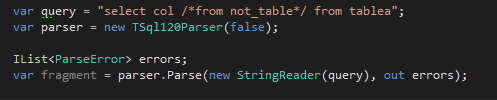
parse some text

The "false" that I passed into TSqlParser120 tells it whether you have quoted identifiers on or not, this and the implicit version that we select by choosing the specific parser is the only thing we need to include.

What we get back is a TSqlFragment which doesn't actually tell us that much, what we need to do is to pass it an object that inherits from TSqlConcreteFragmentVisitor.

TSqlConcreteFragmentVisitor

So this is an interesting thing, what happens is you inherit from it and override one of a whole load of methods. There are 2 methods for each type of statement the ScriptDom understands (SelectStatement, Procedure, StringLiteral, MergeActionClause etc). If we wanted to have a class that lets us retrieve the select statement from the string above we need to create a class that looks something like this:

class SelectVisitor : TSqlConcreteFragmentVisitor
{
public override void Visit(SelectStatement node)
{

}

}

when you create your visitor there are two methods for each statement so you also have ExplicitVisit(SelectStatement node) - explicit visit lets you decide whether or not to bass the base method so you can control whether child objects are parsed or not. In this case and every case I have personally seen, using Vist rather than ExplicitVisit has been the right choice but I guess it might speed up parsing in some cases?

So parsing t-sql into something you can use becomes a sort of two phase thing, firstly you create the parser and get it to create the TSqlFragment which you then pass a visitor that does something with each statement, in this case all we want our visitor to do is to expose the SelectStatement so I will create a public List and add each one to that list which I can then examine when the whole TSqlFragment has been enumerated (visited):

class SelectVisitor : TSqlConcreteFragmentVisitor
{
public readonly List SelectStatements = new List();

public override void Visit(SelectStatement node)
{
SelectStatements.Add(node);
}

}

To get the visit method to be called, I create an instance of the SelectVisitor and pass it to TSqlFragment.Accept:

var visitor = new SelectVisitor();
fragment.Accept(visitor);

After the line "fragmment.Accept(visitor)" completes the visitor has added any select statements in the TSqlFragment to the list of statements so we can just do:


var selectStatement = visitor.SelectStatements.FirstOrDefault();

Now we have a SelectStatement to find the table we first need to look at the property on SelectStatement called QueryExpression which is of type QuerySpecification but what we get in QueryExpression is a the base type QueryExpression which doesn't give us what we want. This is extremely common with the ScriptDom and in many ways is one of the harder things about creating or modifying objects, knowing what can and can't be used for each property.

As an aside to help with this, what I do is use my ScriptDom Visualizer to parse some t-sql and show the actual object types which really helps.

So I do a cast of the QueryExpression to QuerySpecification (you will need to add your own defensive code here) and then we can grab the FromClause which in our case is a list of 1 NamedTableReferene:


var selectStatement = visitor.SelectStatements.FirstOrDefault();
var specification = (selectStatement.QueryExpression) as QuerySpecification;

var tableReference = specification.FromClause.TableReferences.FirstOrDefault() as NamedTableReference;

The full listing is:

using System;
using System.Collections.Generic;
using System.IO;
using System.Linq;
using Microsoft.SqlServer.TransactSql.ScriptDom;

namespace Table
{
class TableNameFinder
{
static void Main(string[] args)
{
var query = "select col /*from not_table*/ from tablea";
var parser = new TSql120Parser(false);

IList errors;
var fragment = parser.Parse(new StringReader(query), out errors);

var visitor = new SelectVisitor();
fragment.Accept(visitor);

var selectStatement = visitor.SelectStatements.FirstOrDefault();
var specification = (selectStatement.QueryExpression) as QuerySpecification;

var tableReference = specification.FromClause.TableReferences.FirstOrDefault() as NamedTableReference;
Console.WriteLine(tableReference.SchemaObject.BaseIdentifier.Value);

}
}

class SelectVisitor : TSqlConcreteFragmentVisitor
{
public readonly List SelectStatements = new List();

public override void Visit(SelectStatement node)
{
SelectStatements.Add(node);
}

}

}

One thing I find is that I keep expecting the ScriptDom to not have an object or be able to do something like parse table hints or options or something that isn't used very often (merge statements!) but it seems to be pretty complete.

Finally

Writing your own parsers and generators for t-sql is a fun thing to do but do it as a hobby for any code that matters use the ScriptDom - there are a few annoyances and a few things to get your head around but it is the right thing to do :)


Learning pathway for SQL Server 2016 and R Part 2: Divided by a Common Language

$
0
0

http://whatculture.com/film/the-office-uk-vs-the-office-us.php

Britain has “really everything in common with America nowadays, except, of course, language.” Said Oscar Wilde, in the Centerville Ghost (1887) whilst George Bernard Shaw is quoted as saying that the “The United States and Great Britain are two countries separated by a common language.”

There are similarities and differences between SQL and R, which might be confusing. However, I think it can be illuminating to understand these similarities and differences since it tells you something about each language. I got this idea from one of the attendees at PASS Summit 2015 and my kudos and thanks go to her. I’m sorry I didn’t get  her name, but if you see this you will know who you are, so please feel free to leave a comment so that I can give you a proper shout out.

If you are looking for an intro to R from the Excel perspective, see this brilliant blog here. Here’s a list onto get us started. If you can think of any more, please give me a shout and I will update it. It’s just an overview and it’s to help the novice get started on a path of self-guided research into both of these fascinating topics.

RSQL / BI background
A Factor has special properties; it can represent a categorical variable, which are used in linear regression, ANOVA etc. It can also be used for grouping.A Dimension is a way of describing categorical variables. We see this in the Microsoft Business Intelligence stack.
in R, dim means that we can give a chunk of data dimensions, or, in other words, give it a size. You could use dim to turn a list into a matrix, for exampleFollowing Kimball methodology, we tend to prefix tables as dim if they are dimension tables. Here, we mean ‘dimensions’ in the Kimball sense, where a ‘dimension’ is a way of describing data. If you take a report title, such as Sales by geography, then ‘geography’ would be your dimension.
R memory management can be confusing. Read Matthew Keller’s excellent post here. If you use R to look at large data sets, you’ll need to know
– how much memory an object is taking;
– 32-bit R vs 64-bit R;
– packages designed to store objects on disk, not RAM;
– gc() for memory garbage collection
– reduce memory fragmentation.
SQL Server 2016 CTP3 brings native In-database support for the open source R language. You can call both R, RevoScaleR functions and scripts directly from within a SQL query. This circumvents the R memory issue because SQL Server benefits the user, by introducing multi-threaded and multi-core in-DB computations
Data frame is a way of storing data in tables. It is a tightly coupled collections of variables arranged in rows and columns. It is a fundamental data structure in R.In SQL SSRS, we would call this a data set. In T-SQL, it’s just a table. The data is formatted into rows and columns, with mixed data types.
All columns in a matrix must have the same mode(numeric, character, and so on) and the same length.A matrix in SSRS is a way of displaying, grouping and summarizing data. It acts like a pivot table in Excel.
 <tablename>$<columnname> is one way you can call a table with specific reference to a column name. <tablename>.<columname> is how we do it in SQL, or you could just call the column name on its own.
To print something, type in the variable name at the command prompt. Note, you can only print items one at a time, so use cat to combine multiple items to print out. Alternatively, use the print function. One magic feature of R is that it knows magically how to format any R value for printing e.g.

print(matrix(c(1,2,3,5),2,2))

PRINT returns a user-defined message to the client. See the BOL entry here. https://msdn.microsoft.com/en-us/library/ms176047.aspx

CONCAT returns a string that is the result of concatenating two or more string values. https://msdn.microsoft.com/en-GB/library/hh231515.aspx

Variables allow you to store data temporarily during the execution of code. If you define it at the command prompt, the variable is contained in your workspace. It is held in memory, but it can be saved to disk. In R, variables are dynamically typed so you can chop and change the type as you see fit.Variables are declared in the body of a batch or procedure with the DECLARE statement and are assigned values by using either a SET or SELECT statement. Variables are not dynamically typed, unlike R. For in-depth look at variables, see Itzik Ben-Gan’s article here.
ls allows you to list the variables and functions in your workspace. you can use ls.str to list out some additional information about each variable.SQL Server has tables, not arrays. It works differently, and you can find a great explanation over at Erland Sommarskog’s blog. For SQL Server 2016 specific information, please visit the Microsoft site.
A Vector is a key data structure in R, which has tons of flexibility and extras. Vectors can’t have a mix of data types, and they are created using the c(…) operator. If it is a vector of vectors, R makes them into a single vector.Batch-mode execution is sometimes known as vector-based or vectorized execution. It is a query processing method in which queries process multiple rows together. A popular item in SQL Server 2016 is Columnstore Indexes, which uses batch-mode execution. To dig into more detail, I’d recommend Niko Neugebauer’s excellent blog series here, or the Microsoft summary.

There will be plenty of other examples, but I hope that helps for now.


Avoiding Duplication Of Database Connection Information In Power BI

$
0
0

In a year’s time there will be a great opportunity for someone to present a session on “Power BI Development Best Practices” at the PASS Summit. Before then, we will all have to work out what those best practices actually are – probably the hard way. With that in mind, here’s a suggestion for one good practice that came out of a conversation at this year’s PASS Summit (thank you Prathy).

If you’re connecting to a data source like SQL Server in Power BI (or Power Query for that matter) you’re probably going to be importing multiple tables of data. For example, if I was importing data from my local SQL Server instance and the Adventure Works DW database, I might see something like this in the Navigator pane in Power BI:

image

Clicking the Load or Edit buttons would create five different queries to get data, one from each of the selected tables:

image

The problem here is that each query duplicates the connection information for the SQL Server database; for example the M code for the FactInternetSales query looks like this:

let
    Source = 
        Sql.Database("chriszbook", "adventure works dw"),
    dbo_FactInternetSales = 
        Source{[Schema="dbo",Item="FactInternetSales"]}[Data]
in
    dbo_FactInternetSales

That means that if you ever need to change the server or database that the queries point to – maybe because the server has migrated, or because you’re moving the reports from dev to test to production – then you have to edit each of these five queries. Which would be a pain.

Ideally Power BI would create a single connection that each of these queries could share, something like a data source in SSRS. In fact I can see that this has already been raised as a suggestion on the forum here and is under review; I’m sure some more votes would raise its profile. However there are certainly a number of different ways you can avoid this kind of duplication by making your own changes to these queries though.

One possible approach would be to create new Power BI queries that returned the names of the SQL Server instance and the database name, and for each of your main queries to reference these queries. To do this you would need to:

1) Create a new query using the Blank Query option:

image

2) Call the query SQLServerInstanceName:

image

3) Open the Advanced Editor window by clicking on the Advanced Editor button on the Home tab, deleting all the automatically generated code in there and replacing it with the name of the SQL Server instance that you want to connect to in double quotes:

image

4) Repeat steps 1-3 to create a new query called SQLServerDatabaseName that returns the name of the database that you want to connect to. It might also be a good idea to create a new group to separate these new queries from the ones that load the data:

image

5) Edit the queries that actually return data so that instead of hard-coding the instance name and database name, they take these values from the queries you have just created. A Power BI query can return a value of any data type (not just a table), and the queries created in steps 1-4 return values of type text – the names of the SQL Server instance and database to connect to. These queries can now be used as variables in other queries, so after editing the FactInternetSales query shown above would look like this:

let
    Source = 
        Sql.Database(SQLServerInstanceName, SQLServerDatabaseName),
    dbo_FactInternetSales = 
        Source{[Schema="dbo",Item="FactInternetSales"]}[Data]
in
    dbo_FactInternetSales

image

Now, if you ever need to change the connection you just need to change the values in these two queries rather than edit every single query that returns data.

There are other ways of solving this problem: for example you could have a query that returns the output of Sql.Database() (as used in the Source step in the FactInternetSales query shown above)and have all the other data load queries reference that. I like the approach I show here though because it makes it very easy to see the values for the SQL Server instance and database that are currently in use. If you’re being even more ambitious – maybe because you have many queries in many .pbix files that connect to the same database – you could even store connection information somewhere outside the .pbix file, maybe in another SQL Server database. But if you did that, you would then need to worry about the connection information for that database too…


Notes From the PASS Summit Keynote

$
0
0

Well, here we are, another PASS Summit behind us. Each Summit is special to me, in different ways. It’s like having children; you love each of them but for different reasons and in different ways. This year marked my second, and final, year as PASS President. Along with the usual...

The post Notes From the PASS Summit Keynote appeared first on Thomas LaRock.

If you liked this post then consider subscribing to the IS [NOT] NULL newsletter: http://thomaslarock.com/is-not-null-newsletter/

Connect to SQL Server on Azure VM via Local SSMS

$
0
0

After you provision a Microsoft Azure VM with SQL Server there are a few more steps that you need to take to make remote connections. The procedure below starts with a fresh Azure VM provisioned and walks through the process of establishing a connection via SQL Server Management Studio, installed on an on-premises work station.

Create a new Azure TCP/IP endpoint

Start by accessing the Azure portal and navigating to your new VM.

azure-tcp-endpoint-1

Drill into your VM, navigate to the ENDPOINTS tab, and click ADD to create a new endpoint.

azure-tcp-endpoint-2
A wizard will appear. Select ADD A STAND-ALONE ENDPOINT and click the right-arrow.

azure-tcp-endpoint-3
Use the drop-down box to select MSSQL and edit the ports, if you choose.

azure-tcp-endpoint-4

Click the check mark to complete and then wait for the Azure portal to tell you that the endpoint has been created.
azure-tcp-endpoint-5

Remote desktop into your VM

Once our endpoint is created we will need to do some work with Windows and SQL Server. Navigate to your Azure VM Dashboard and download your customized .rdp file with the CONNECT button.

azure-rdp-1

Connect to your VM via the downloaded .rdp file.

azure-rdp2

Verify TCP/IP is enabled for SQL Server

Open up SQL Server Configuration Manager and enable the TCP/IP protocol, if it is not already. In the VM image that I provisioned for SQL Server 2016 CTP 3.0 the TCP/IP protocol was enabled but it is always good to verify.

azure-sql-tcp-1

Configure SQL Server for Mixed Mode authentication

Open SQL Server Management Studio, right-click on your instance in the object explorer and select Properties. On the Security page, select the SQL Server and Windows Authentication mode radio button and hit OK. Finish up by restarting your SQL Server instance for the setting to take effect.

azure-sql-tcp-2

Open your SQL Server connection port

Finally we have to open up the SQL Server connection port in the Windows Firewall with Advanced Security by creating a new inbound rule.

azure-firewall-rule-1

When the wizard opens, select the rule type Port and click Next.

azure-firewall-rule-2

Specify your port and click Next.

azure-firewall-rule-3

Allow the connection and then click Next.

azure-firewall-rule-4

Another Next…

azure-firewall-rule-5

…followed by a name for your rule and click Finish.

azure-firewall-rule-6

Connect

Now it is time to test. Disconnect from your remote desktop session and launch SSMS on your work station. Connect using your Azure DNS name…

azure-ssms-1

…SUCCESS!

azure-ssms-2


Microsoft SQL Server resourceWritten by Derik Hammer of SQL Hammer

Derik is a data professional focusing on Microsoft SQL Server. His passion focuses around high-availability, disaster recovery, continuous integration, and automated maintenance. his experience has spanned long-term database administration, consulting, and entrepreneurial ventures.

Derik gives the SQL community credit for plugging the gaps in his knowledge when he was a junior DBA and, now that his skills have matured, started SQLHammer.com as one small way to give back and continue the cycle of shared learning.

Derik is the owner and lead author of SQL Hammer, a Microsoft SQL Server resource.

For more information, visit http://www.sqlhammer.com. Follow Derik on Twitter for SQL tips and chat

The post Connect to SQL Server on Azure VM via Local SSMS appeared first on SQL Hammer.

MVP Summit 2015 – A Few (Surprising) Lessons Learned

$
0
0

MVP Summit is always an amazing event. This year was no exception.  It’s one part boot camp, one part super-secret secret-telling time, and one part family reunion. Along with that, we get cool swag (like the utterly amazing Data Platform jackets Jennifer Moser hooked us up with this year), interesting conversations, and time with the guys & gals who build the products we’ve bet our careers on. Needless to say, I was happy to be there.

This year was also a little different, and I want to talk about that for a minute. There has been a lot of buzz since Satya Nadella took the helm at Microsoft that things were going to be Different. That product teams were going to align, that they’d be smarter about how they build software, and that they’d move faster than they ever have before. I have to be honest… I thought it was all marketing hype. Until last week.

The very first thing I noticed on Monday morning was that the level of transparency was through the roof. As a person who builds software for a living, I know that we all err on the side of pretending like we have all the answers and that our process is bulletproof. That was not the message from anyone on the Microsoft team last week. While it is always awesome to hear about what’s new on the technical side of things, there was another level of value coming out of the talks. Honesty. A willingness to fail. Engagement that was real. Actual two-way conversations.

One of the things I love to do during presentations is take a lot of notes. Along with the obligatory talking points and feature notes, I like to write down things that are said by the presenters that resonate. I cannot share the exact quotes because of NDA rules, but I have been given permission to share the gist of what I learned.  Because I spend way too much time on Imgur, I’m including memes to illustrate my points.

Don’t be afraid to fail. Failing, and failing fast, gets you to the good stuff.

success kid

Sometimes, you have to admit that you’re doing something totally new and that you might not already be an expert. This is okay. Go learn it, then you can build it.

doge

There’s a lot of new stuff coming at us. Embrace it. It ain’t going away.

kitten hug

Applaud the person who points out that things aren’t on the right track.  She’s the one who is unafraid.  (And as Mr. Herbert taught us, fear is the mind-killer)

penguin cake

Experiment. Try something different. Be willing to fail and then try again. It’s science.

meme by: http://knowyourmeme.com/users/deathbyexileThat’s Neil deGrasse Tyson, y’all

In all seriousness, to hear these kinds of messages coming from the most venerable software development organization in our business was inspiring. It made me feel like going home and taking a few risks. It made me feel like we were all in this together. Data and data management is moving at an insane pace these days. Always changing, always moving forward. Keeping up is overwhelming on a good day. That the experts at Microsoft are saying , “We’re learning right along with you. We’ll get this.”, it is empowering.

My point is, the technical stuff was great. The product positioning information was helpful. But my real takeaway last week was that… well, let me share one little story…

I was in a meeting about a (NDA – sorry, y’all) thing. The presenter threw out some concepts and thoughts about the thing. I raised my hand and said, “I think I have a use case for you. Let me run you through a scenario that one of my clients has.” After I explained what I needed, I asked, “So, how would you solve this problem?”. The response? “I don’t know yet. But I think we can solve it together. Let’s stay in touch and see if we can come up with some good ideas.”

And that’s it right there. I went to a session about a topic where Microsoft didn’t have the answer yet. They still got in front of us and talked about where they were, what their goals were, and what they were doing to move forward. And when we had ideas or real-world problems to solve, they engaged. They asked us for help. Not “help”, as in, “fill out this survey for us; we promise we’ll do something with your feedback”. We were treated as peers and as people on the ground who had real value to add to the conversation. It was a little bit amazing.

And you know what? It’s working. They’re doing more, faster. They’re innovating in a way that big companies aren’t supposed to be able to do. I’m excited about where we’re headed.

So in short, thank you to Microsoft, the MVP Summit organizers, and everyone who makes our experience as MVP’s special. It was an awesome week.

Fail fast, my friends.

–Audrey

Why are you still using datetime?

$
0
0

T-SQL Tuesday It’s almost Thanksgiving time again! Let’s see, what am I thankful for? T-SQL Tuesday! Someone else get’s to pick a blog topic for me! In this case it’s the always fun Mickey Stuewe(b/t) and her topic is Data Modeling Gone Wrong. So let’s see .. a Data Model is a small toy data right? Ok, so maybe it’s not. Definitions are not my strong suit. So what is Data Modeling? The simplest definition I could find for my purposes is this:

Data models define how the logical structure of a database is modeled.

So basically, if I understand it correctly, data modeling is in part the database design. And as it happens I’ve had a question about database design (gone wrong) for a while.

Why is everyone still using the DateTime datatype exclusively?

Back in SQL 2008 we gained a whole new range of date/time datatypes. Isn’t it about time we started to use them? Don’t get me wrong, datetime is still useful, if you actually need accuracy to three thousandths of a second and you aren’t going too far back into the past (earlier than 1753). Oh, and you only care about one time zone. Frequently though we don’t really care about the time (date of birth, credit card activation date, etc) in which case we can use the Date datatype. This has some major advantages. DateColumn = ‘1/1/2012’ will actually give you accurate answers for example. Not to mention the 5 byte size savings (8 byte datetime – 3 byte date). But what if the time is really important (shift or time of day calculations)? If so use the Time data type. This way you can put an index on the time specifically. Need to work with time zones? DateTimeOffset. Need the date with a lower accuracy time (seconds)? SmallDateTime, and that one’s been around since 2005. And last but not least, what if you need really high precision time? DateTime2 can take you down to a ten millionth of a second.

So let me ask again. Why is that column a datetime?


Filed under: Microsoft SQL Server, SQLServerPedia Syndication, T-SQL Tuesday Tagged: database design, microsoft sql server, T-SQL Tuesday

T-SQL Tuesday #72 Invitation – Data Modeling Gone Wrong

$
0
0

SqlTuesdayT-SQL Tuesday is here again. I’ve had good intentions the past few times this event has come around and even have drafts still waiting to be queued up which I will eventually turn into regular blog posts, but I decided to just make time this month and jump back into the monthly party.

This month Mickey Stuewe (b|t) is hosting and has asked for some data modeling practices that should be avoided, and how to fix them if they occur.

What is Data Modeling?

Data Modeling itself is referred to as the first step of database design as you move from conceptual, to logical, to actual physical schema.

While that definition sounds simplistic, we can expound upon it to arrive to the conclusion that data modeling is a very important aspect from database design on all levels.

What to Avoid?

As a data professional and in senior management I’ve seen pit falls wide-spread in various business units when it comes to design architecture. The listing you are about to read are some of the methods and items I’ve discovered on my journey and conducting gap analysis type of events that carry a chain reaction. They consist of doomed failure from the get go.

  1. Audience– the audience and/or participants should be defined up front. I differ with many and that’s okay. To me the ability to identify business stakeholders, subject matter experts, technical groups, BA’s is an integral piece to the puzzle. Too many times I have seen the engine pull out of the gates with a design to only find out that the design and documentation to not even meet the criteria and standards of the shop.
  2. Detailed Project– how many times have you received documentation only to find out there was not enough meat to get the project off the ground? As a data professional we do think out of the box; however it is imperative to be clear and concise up front. When my team is given projects to complete that involve Database Design and creation, I implore business units to provide as much detail up front that is agreed upon. This helps streamline and makes for better efficiency.
  3. Understandability– With details comes the ability to articulate understandably. All to often items get lost in translation which causes additional work on the back-end of the database. This could mean unfortunate schema changes, large amounts of affected data, and so on.
  4. Business Continuity – ask yourself a question in design phase. Is what you are building that will be presented to the business efficient? Will business be able to decipher what is being presented back to them; if not why?
  5. Downstream Analytics– How does the business want to see this data in the form of analytics or reporting?  Most modern systems are going to either be queried by, or push data to, ETL processes that populate warehouses or other semantic structures.  Avoid complex table relationships that can only be interpreted by the code that stores the data.  Make sure you define all your data domains so that the BI professionals are not scratching their heads trying to interpret what a status of ‘8’ means. (In speaking with a colleague, Tom Taylor, at my shop – he brought up this valid point).

Items To Look For

Some key and general practices to look at and decide on are:

  1. Primary Keys – yes they are your friend – add them.
  2. Look at all audit data and what needs to be audited
  3. Clustered/Non Clustered indexes – have you read through your execution plan?
  4. Has the scope of the data model been met?
  5. Are tables normalized properly?
  6. One Data Modeling Tool – it’s easier if the team is looking at one utility together; if you have many varieties spread across many team members it could leave views skewed.

Conclusion

Data modeling, in and of itself, is a key component for any business. What often falls by the wayside is the poor leg work done up front. You have to lay a proper foundation in order to be successful with any design; taking into consideration all personnel in order to make the best strategic decisions to move forward.

Hopefully the next time you go down this path you have some questions to ask yourself along with some solutions to those problems.

What is T-SQL Tuesday.

Adam Machanic’s (b|t) started the T-SQL Tuesday blog party in December of 2009. Each month an invitation is sent out on the first Tuesday of the month, inviting bloggers to participate in a common topic. On the second Tuesday of the month all the bloggers post their contribution to the event for everyone to read. The host sums up all the participant’s entries at the end of the week. If you are interested in hosting and are an active blogger than reach out to Adam and let him know of your interest.


Power BI DirectQuery Mode: Not Just SSAS DirectQuery v2.0

$
0
0

When DirectQuery mode for Power BI was announced I assumed it was just the next version of SSAS Tabular DirectQuery mode with the same extra features that we’ll get in SSAS 2016 (such as better SQL generation, and other benefits enabled by Super-DAX). If it was just that I would have been happy, but there’s something else that was mentioned in Miguel’s video introducing the feature that I almost missed, something that is also hinted at in the documentation where it mentions the following limitation:

If the Query Editor query is overly complex an error will occur. To remedy the error you must: delete the problematic step in Query Editor, or Import the data instead of using DirectQuery

It turns out that Power BI in DirectQuery mode is actually SSAS DirectQuery version 2.0 combined with Power Query/Power BI “Get Data”’s query folding capabilities (where the logic in your queries is pushed back to the data source rather than evaluated inside Power BI) – which is quite interesting.

Let’s look at an example using the Adventure Works DW database and SQL Server. If you import just the DimDate table in DirectQuery mode and create a table that shows the count of values from the DateKey column grouped by CalendarYear, like this:

image

The following SQL will be generated:

SELECT 
TOP (1000001) [t0].[CalendarYear] AS [c15],
COUNT_BIG([t0].[DateKey])
 AS [a0]
FROM 
(
(select [$Table].[DateKey] as [DateKey],
    [$Table].[FullDateAlternateKey] as [FullDateAlternateKey],
    [$Table].[DayNumberOfWeek] as [DayNumberOfWeek],
    [$Table].[EnglishDayNameOfWeek] as [EnglishDayNameOfWeek],
    [$Table].[SpanishDayNameOfWeek] as [SpanishDayNameOfWeek],
    [$Table].[FrenchDayNameOfWeek] as [FrenchDayNameOfWeek],
    [$Table].[DayNumberOfMonth] as [DayNumberOfMonth],
    [$Table].[DayNumberOfYear] as [DayNumberOfYear],
    [$Table].[WeekNumberOfYear] as [WeekNumberOfYear],
    [$Table].[EnglishMonthName] as [EnglishMonthName],
    [$Table].[SpanishMonthName] as [SpanishMonthName],
    [$Table].[FrenchMonthName] as [FrenchMonthName],
    [$Table].[MonthNumberOfYear] as [MonthNumberOfYear],
    [$Table].[CalendarQuarter] as [CalendarQuarter],
    [$Table].[CalendarYear] as [CalendarYear],
    [$Table].[CalendarSemester] as [CalendarSemester],
    [$Table].[FiscalQuarter] as [FiscalQuarter],
    [$Table].[FiscalYear] as [FiscalYear],
    [$Table].[FiscalSemester] as [FiscalSemester]
from [dbo].[DimDate] as [$Table])
)
 AS [t0]
GROUP BY [t0].[CalendarYear] 

Then, if you go to Edit Queries and set a filter on EnglishDayNameOfWeek so that you only get the dates that are Fridays, like so:

image

The click Close And Apply, you’ll see that the table now shows the count of dates in each year that are Fridays (as you would expect):

image

…and the SQL generated also reflects that filter:

SELECT 
TOP (1000001) [t0].[CalendarYear] AS [c15],
COUNT_BIG([t0].[DateKey])
 AS [a0]
FROM 
(
(select [_].[DateKey],
    [_].[FullDateAlternateKey],
    [_].[DayNumberOfWeek],
    [_].[EnglishDayNameOfWeek],
    [_].[SpanishDayNameOfWeek],
    [_].[FrenchDayNameOfWeek],
    [_].[DayNumberOfMonth],
    [_].[DayNumberOfYear],
    [_].[WeekNumberOfYear],
    [_].[EnglishMonthName],
    [_].[SpanishMonthName],
    [_].[FrenchMonthName],
    [_].[MonthNumberOfYear],
    [_].[CalendarQuarter],
    [_].[CalendarYear],
    [_].[CalendarSemester],
    [_].[FiscalQuarter],
    [_].[FiscalYear],
    [_].[FiscalSemester]
from [dbo].[DimDate] as [_]
where [_].[EnglishDayNameOfWeek] = 'Friday')
)
 AS [t0]
GROUP BY [t0].[CalendarYear] 

What’s happening here is that the output of “Get Data” (we so need a better name for this feature – how about “the functionality formerly known as Power Query”?) becomes the inner SELECT statement with the filter on EnglishDayNameOfWeek; while the table in the report that returns the count of dates by Year is responsible for generating the outer SELECT statement with the GROUP BY (this is the part of the Power BI engine that is related to SSAS DirectQuery).

Now, you can only do this if all the steps in “Get Data” can be folded back to SQL. How do you know if they can or not? Well, if query folding can’t take place then you’ll get an error: this is what is meant by the warning about your query being “overly complex” in the documentation. Unfortunately there’s no way of knowing in advance what can be folded and what can’t; with every release of Power BI Desktop and Power Query I’ve noticed that more and more things can be folded (and I’m always pleasantly surprised at the transformations that can be folded, such as pivots and basic calculated columns), but there are still plenty of limitations. For example at the time of writing adding an index column to your query will prevent query folding and therefore break DirectQuery. If you do this, you’ll see the following error in the Query Editor window:

This step results in a query that is not supported in DirectQuery mode

image

Even with this restriction I think the ability to apply transformations in Get Data is very useful indeed, because it means you have a lot of scope for cleaning and filtering data in DirectQuery mode and therefore building ‘live’ reporting solutions on data that isn’t modelled the way you’d like it to be.

While I’m talking about DirectQuery mode, there are a few other points I’d like to mention:

  • Remember, it’s still in Preview and so it has some limitations and bugs. For example, I’ve hit an issue where DirectQuery fails with a connection from my “Recent Sources” list, but works ok if I create a new connection.
  • Prepare to be underwhelmed by the performance of DirectQuery, people: remember this is just ROLAP by another name, ROLAP has been around for years, and ROLAP has always had performance problems. These problems are not just related to the speed of the underlying engine or the size of the data – the ability of the OLAP engine to generate the SQL to get the data it needs also plays a major role. SSAS Multidimensional ROLAP and SSAS Tabular 2012-4 DirectQuery generate some pretty wretched SQL even in the most simple scenarios and it looks like Power BI DirectQuery is a big improvement on them. But what about more complex queries? This is a very difficult problem to crack. My feeling is that if your data does fit into Power BI’s native engine then you should import it rather than use DirectQuery, if you want to get the best possible query performance.
  • I suspect that this performance issue is also the reason why the New Measure button is greyed out in Power BI Desktop when you’re in DirectQuery mode. This isn’t a limitation of the engine because SSAS Tabular does support more complex DAX measures in DirectQuery mode, albeit with some restrictions on the functions you can use. However, the more complex your DAX measures are, the more complex the problem of generating SQL becomes and the more likely your queries are to be slow. I don’t think this is a good reason for completely preventing users from creating their own measures though: there are lots of scenarios where you will need to create measures and performance would still be acceptable. Maybe this is an example of an ‘advanced’ feature that could be switched on by power users?

The Dangers of Indexing Temp Tables

$
0
0

Indexes are good, except when they aren’t. Everything that you do in SQL Server has trade offs. Usually those tradeoffs are easy to see, unless they aren’t.

Indexes are generally a good thing. They make performance of queries within the database engine go faster, often a lot faster. Indexes on temp tables are also usually a good thing, unless you built them incorrectly then as one client of mine just found out things can get very bad very quickly.

This client had just upgraded from SQL Server 2008 R2 to SQL Server 2014 and the Monday after we did the upgrade (the first full business day running on SQL Server 2014) things fell apart, fast. We saw huge amounts of locking and waits on tempdb. The waits were reported as PAGELATCH_IO waits, but the disks according to perfmon had a 1-2ms response time. So it was something happening in memory. All the sessions were locking on a specific page in tempdb, 2:1:128. I looked at the page with DBCC PAGE and found that it was part of sysobjvalues. This table is used in storing information about temporary objects.

With the help of a Microsoft developer who looked through some minidumps from the SQL Server he was able to identify the code pattern that was causing the problem. The root of the problem was that temp tables weren’t being properly cached in the tempdb database. The reason for this is that the tables were being created without any indexes then a clustered index was being added to the temp table after the fact. In this case the code looked something like this:

CREATE TABLE #t1 (c1 int)
CREATE UNIQUE CLUSTERED INDEX I ON #t (c1) WITH IGNORE_DUP_KEY
INSERT INTO #t1 (c1) SELECT * FROM @Something

We were able to resolve the issue by removing the clustered index and making the column c1 a primary key, then doing a distinct insert into the table. Long term the developers are going to clean up the data within the .NET layer so that we know that distinct values are coming into the table so that we can remove the distinct. The new temporary code looks like this:

CREATE TABLE #t1 (c1 int primary key, c2 int, c2 int)
INSERT INTO #t1 (c1) SELECT DISTINCT c1 FROM @Something

Finding the problem code was pretty easy. The Microsoft developer was able to give me the names of a couple of stored procedures. The rest I was able to find by searching through sys.sql_modules looking for anything with “%WITH%IGNORE_DUP_KEY%” or “%CREATE%INDEX%” in the object code. After fixing these the system started performing MUCH, MUCH better.

Denny

The Resurrection of Reporting Services & The Maturing of Power BI

$
0
0
Spending the past two weeks at the annual PASS Global Summit and the Microsoft MVP Summit, I’ve consumed a literal firehouse of information about the Microsoft BI platform.  I’ve participated in the PASS Summit for twelve years and the MVP Summit for seven years this far.  In that time, I don’t recall as much innovative … Continue reading

Hiding one or more columns

$
0
0

This isn’t something you have to do frequently, but sometimes you don’t want the users to have access to certain columns in a table. For example let’s say you have a salary column in your employee table that you don’t want everyone seeing.

There are two fairly simple options.

CREATE TABLE Employee (
	EmployeeId int NOT NULL IDENTITY (1,1),
	Name varchar(255),
	Address1 varchar(255),
	Address2 varchar(255),
	City varchar(255),
	State varchar(255),
	Zip varchar(50),
	Salary money
);


Column level security

Otherwise known as the hard way. Here you grant permissions to just the columns of the table that you want someone to have access to.

Open the permissions tab for the user and add the object you are interested in. Check Grant for the SELECT permission. Then hit the COLUMN PERMISSIONS button.

ColumPerms1

Select the column level permissions we are interested in. Note we did not check Grant for the Salary column.

ColumPerms2

Now instead of a check in the box there’s a square. This tells us that the permissions are not uniform across all of the columns.

ColumPerms3

In code:

GRANT SELECT ON [dbo].[Employee] ([EmployeeId]) TO [Doctor];
GRANT SELECT ON [dbo].[Employee] ([Name]) TO [Doctor];
GRANT SELECT ON [dbo].[Employee] ([Address1]) TO [Doctor];
GRANT SELECT ON [dbo].[Employee] ([Address2]) TO [Doctor];
GRANT SELECT ON [dbo].[Employee] ([City]) TO [Doctor];
GRANT SELECT ON [dbo].[Employee] ([State]) TO [Doctor];
GRANT SELECT ON [dbo].[Employee] ([Zip]) TO [Doctor];

So why is this a problem? Well here is a simple example. I log in as Doctor and I run the following query:

SELECT * FROM Employee

And I get this error:

Msg 230, Level 14, State 1, Line 13
The SELECT permission was denied on the column ‘Salary’ of the object ‘Employee’, database ‘Test’, schema ‘dbo’.

We can avoid the error if we just query the specific columns (which is what we should be doing anyway) but a lot of code is libel to break. I also want to point out that not only did this cause an error but it also let the user know that a Salary column even existed.

Which leaves us with:

Access through views

Otherwise known as the easy way.

We create a view that doesn’t include the column(s) we don’t want them to see.

-- Cleanup code (drop the table & re-create 
-- it to get rid of existing permissions)
IF OBJECT_ID('Employee') > 0 
	DROP TABLE Employee;
GO
CREATE TABLE Employee (
	EmployeeId int NOT NULL IDENTITY (1,1),
	Name varchar(255),
	Address1 varchar(255),
	Address2 varchar(255),
	City varchar(255),
	State varchar(255),
	Zip varchar(50),
	Salary money
);
GO
CREATE VIEW EmployeeList AS
SELECT 
	EmployeeId, Name, Address1, Address2,
	City, State, Zip
FROM Employee;

GRANT SELECT access to the view.

GRANT SELECT ON [dbo].[EmployeeList] TO [Doctor];

Now if Doctor tries to query against the Employee table they get a standard The SELECT permission was denied on the object ‘Employee’ error with no mention of any of the columns. But if they query the view EmployeeList they get the data we want them to have. And as a bonus both SELECT * or SELECT columnlist will work.


Filed under: Microsoft SQL Server, Security, SQLServerPedia Syndication, T-SQL Tagged: microsoft sql server, object permissions, security

Community Involvement–Why Wait?

$
0
0

PleaseWaitEveryone has a story; some stories are similar while some stories are vastly different. People always make the statement that you shouldn’t “assume” because if you do….well then you know what happens!

I will go out on a limb and gather to say that many fall into the category I did when it comes to the SQL community. From the years 2000-2010 I had no clue that the SQL community existed yet alone any conferences. It was when I was hired on at my current shop did I learn of this thing they called PASS Summit.

From 2011- to present I can honestly say it has been one heck of a ride. A lot has transpired over the course of soon to be 5 years and I’m thankful for it; I wouldn’t change a thing. I look back at those first 10 years and I was floundering – man o man was I floundering. What that time means to me now though is a light into the future and to know where, as a data professional, a direction I want to go in.

I’m starting to get asked more and more the question of “What can I do to get involved within the SQL community?” or “I’m not good enough to get involved”.

My answer to that is simple, let’s roll. Below are five avenues in which you can get started with community involvement. All they require are you; yes that’s right you to take the initiative and get involved.

Blogging

I can tell you that blogging was not an easy thing for me to get started on but has been well worth it. I’m not the most talented writer; nor am I one of the most captivating individuals you will ever meet. What I do feel that I can bring to the table is real world life examples that have helped me along my way in my SQL journey, and guess what – you can be the same. Some things to keep in mind when starting out to blog are:

1. Don’t beat yourself up if you start to write, but have mental blocks.

2. Get a few blog posts in the pipeline and scheduled to help get your feet wet.

3. Find a good platform; there are several out there such as WordPress.

4. If writing examples; then prove your examples. Don’t just write to be writing. Have a point prepared.

5. If you reference someone’s work then give credit where credit is due. This is a huge pet peeve of mine.

Social Media

In this day and age it is almost impossible to not be connected through some form of social media. You can find many groups, hash tags, companies to follow, and other viable sources to become involved with. Some different types are:

1. Twitter – pay attention to hash tags such as #sqlfamily, #sqlserver, #tsql2sday, #sqlhelp

2. LinkedIn

3. Facebook

4. Instagram

One caveat I want to add here is be professional; companies do look at your involvement.

PASS Active Member

Become an active member in PASS; it doesn’t cost you anything and can provide various forms of volunteering. This type of involvement has changed my career allowing me to see on a more global scale of how impactful our SQL community can be.

Learn more about the PASS Summit here.

SQL Saturday Events

These events are free. Let me ask you this; does your company not want to provide you with any training; or better yet maybe they do and just don’t know how. These events are free except for lunches and has some very talented speakers that attend. Take advantage of these; you can get a current listing on my blog here or go visit SQL Saturday’s home page here for further information.

Mentor

Maybe you have been in the community for a while and it has become stale. One idea would be to mentor someone; doesn’t have to be someone in a different state; how about someone you work with that is needing help. Do you remember when you started out? I sure do and I would have loved to have some guidance and help earlier on in my career. Five years ago I was fortunate to learn and model some of my ways from a group I called my “fab five” – give them a read here; truly thankful for these individuals.

Mentoring someone ignites the passion to keep those knowledge juices flowing; each one reach one effect.

Recap

I’ve come to learn through my 5 years of involvement with the SQL community that it is not always a bed of roses and flying unicorns but SQL family is composed of not only some of the brightest minds in the business but also individuals who care for one another and who genuinely step in and help when needed.

So I ask you, why wait? How many years will you let go by like I did before you become involved? There has not been one day where I have regretted becoming involved within the SQL community and if you would like to talk more about how to get started let me know. I will be happy to discuss with you offline if need be.

It’s GameTime folks; Let’s roll and keep this community moving forward.


A Data Age proclamation

$
0
0
Twice in two days now, I’ve gotten in discussions with people about the state of data usage…the idea that we have absolutely massive amounts of data at our disposal – especially us, as if you’re reading this, you’re likely a DBA or at least an IT professional – but that people are not using data to its fullest extent. … Continue reading A Data Age proclamation

#0362 – SQL Server – Change Detection in Microsoft SQL Server – Limitations of T-SQL: BINARY_CHECKSUM and CHECKSUM

$
0
0

Identification of changes made to the data in a system is an important aspect of data storage design and data cleanup/quality improvement activities. For most enterprise systems, the need to implement change detection is driven by some sort of auditing requirements. A couple of years ago, I authored a series of articles on SQLServerCentral.com and on this blog around data change and tamper detection mechanisms available in Microsoft SQL Server. These are:

  • An in-depth look at change detection in SQL Server – Part 01 [Link]
  • An in-depth look at change detection in SQL Server – Part 02 [ Link]
  • HASHBYTES: Is CHECKSUM really required? [Link]
  • HASHBYTES-String or binary data would be truncated: Msg 8152 [ Link]

A recent coincidence at work prompted me to write this post. I was working on comparing a set of records from one table to another after a data cleanup exercise when I realized that a couple of my checksums were coming up as 0, i.e. a blank string (as disccussed in my article on Chage Detection, part 01). The twist to the tale was that there were no blank strings in the sample that I was using.

The Problem

In order to demonstrate the issue clearly, I have prepared the following sample. As can be seen from the sample, both CHEKSUM and BINARY_CHECKSUM work as expected as long as the string under evaluation is less than 26,000 characters in length. As soon as the string hits the 26,000 mark, the functions stop working.

USE tempdb;
GO

DECLARE @stringPatternToReplicate VARCHAR(MAX) = 'a'
DECLARE @stringPatternToEvaluate VARCHAR(MAX)
DECLARE @replicateTillLength INT = 25999
SELECT @stringPatternToEvaluate = REPLICATE(@stringPatternToReplicate,@replicateTillLength);
SELECT LEN(@stringPatternToEvaluate) AS StringLength,
       CHECKSUM(@stringPatternToEvaluate) AS CheckSumForString,
       BINARY_CHECKSUM(@stringPatternToEvaluate) BinaryCheckSumForString,
       @stringPatternToEvaluate AS StringPatternToEvaluate;

--Repeat after incrementing the @replicateTillLength by 1
SELECT @replicateTillLength += 1
 
SELECT @stringPatternToEvaluate = REPLICATE(@stringPatternToReplicate,@replicateTillLength);
 
SELECT LEN(@stringPatternToEvaluate) AS StringLength,
       CHECKSUM(@stringPatternToEvaluate) AS CheckSumForString,
       BINARY_CHECKSUM(@stringPatternToEvaluate) BinaryCheckSumForString,
       @stringPatternToEvaluate AS StringPatternToEvaluate;
GO

Solution?

The quick solution that I moved ahead with was to perform a direct comparison of the strings involved.

Now, we know that CHECKSUM and BINARY_CHECKSUM will not work if the datatype being evaluated is one of: text/ntext/image/cursor/xml. But, in the example provided above, the strings were the classic – VARCHAR with the MAX keyword to allow storage > 8000 characters.

However, I would like to invite views from you, the kind reader on whether you have faced a similar issue in the past or whether you have any other ideas to resolve this issue.

Summary:

Checksum and BINARY_CHECKSUM can fail to detect a change if:

  • The characters involved are not standard ASCII characters, i.e. have an ASCII value greater than 255
  • The string is a blank string
  • The string is more than 25,999 characters in length (as demonstrated above)

Open Item

I would like to invite views from you, the kind reader on whether you have faced a similar issue in the past or whether you have any other ideas to resolve this issue.

I have written up a Microsoft Connect ticket for this issue to look for an official explanation [MS Connect item #2021430].

Further Reading

  • An in-depth look at change detection in SQL Server – Part 01 [Link]
  • An in-depth look at change detection in SQL Server – Part 02 [ Link]
  • HASHBYTES: Is CHECKSUM really required? [Link]
  • HASHBYTES-String or binary data would be truncated: Msg 8152 [ Link]

Until we meet next time,
Be courteous. Drive responsibly.


Filed under: #SQLServer, #TSQL, Connect Cases, Debugging, Development, Guidance

First Look At SSAS 2016 MDX On DirectQuery

$
0
0

Following on from my last post covering DirectQuery in Power BI, I thought it might be interesting to take a look at the way MDX queries are supported in SSAS Tabular 2016 CTP3 DirectQuery mode.

There were a lot of limitations when using DirectQuery in SSAS Tabular 2012/4, but for me the showstopper was the fact that it only worked if you were running DAX queries against your model. Historically the only major client tool that generated DAX queries to get data was Power View, and Power View was/is too limited for serious use, so that alone meant that none of my customers were interested in using DirectQuery. Although we now have Power BI Desktop and PowerBI.com, which also generate DAX queries, the fact remains that the vast majority of business users will still prefer to use Excel PivotTables as their primary client tool – and Excel PivotTables generate MDX queries. So, support for MDX queries in DirectQuery mode in SSAS 2016 means that Excel users will now be able to query a Tabular model in DirectQuery mode. This, plus the performance improvements made to the SQL generated in DirectQuery mode, means that it’s now a feature worth considering in scenarios where you have too much data for SSAS Tabular’s native in-memory engine to handle or where you need to see real-time results.

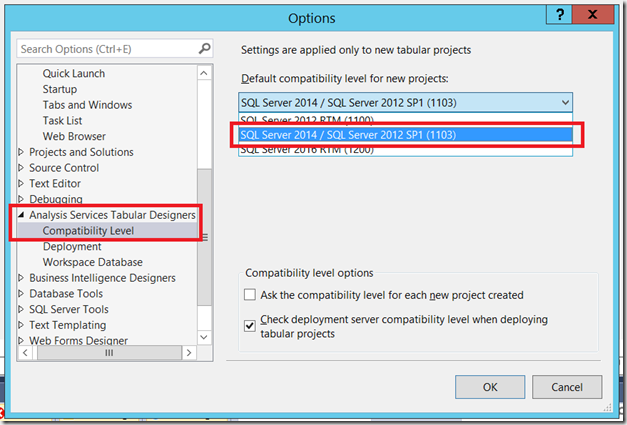
At the time of writing the most recent release of SQL Server 2016 is CTP3. If you want to test out the BI features in SQL Server 2016 CTP3 in an Azure VM, I highly recommend Dan English’s blog post here showing how to set one up. To test DirectQuery mode you need to use the older 1103 compatibility mode for your project and not the latest 1200 compatibility mode. This is documented in the release notes:
https://msdn.microsoft.com/en-us/library/dn876712.aspx#bkmk_2016_ctp3_0

image

Once you’ve created your project, you can enable DirectQuery mode in the same way as in previous versions by following the instructions here. The DirectQueryMode property on Model.bim needs to be set to On, and the QueryMode property on the project should be set to DirectQuery.

For testing purposes I downloaded the 2016 version of the Adventure Works DW database and restored it to SQL Server, then created a SSAS Tabular model containing only the DimDate table to keep things simple. I created one measure in the model with the following definition:
TestMeasure:=COUNTROWS(‘DimDate’)

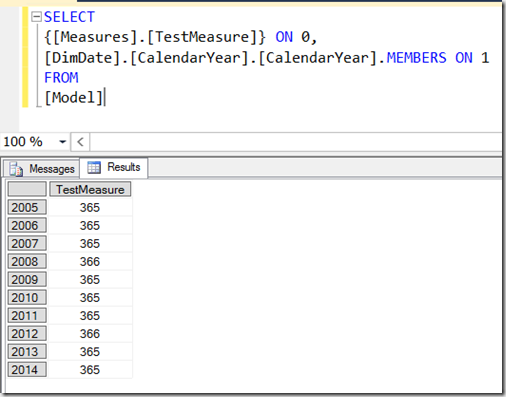
First of all, I ran the following MDX query:

SELECT
{[Measures].[TestMeasure]} 
ON 0,
[DimDate].[CalendarYear].[CalendarYear].MEMBERS 
ON 1
FROM
[Model]

image

Using a Profiler trace (yes, I know I should be using XEvents but Profiler is so much more convenient for SSAS) I could see the SQL generated by SSAS in the Direct Query Begin and Direct Query End events. For the MDX query above there were three SQL queries generated. The first looks like it is getting the list of years displayed on the Rows axis:

SELECT 
TOP (1000001) [t0].[CalendarYear] AS [c15]
FROM 
(
  (SELECT [dbo].[DimDate].* FROM [dbo].[DimDate])
)
AS [t0]
GROUP BY [t0].[CalendarYear] 

The second SQL query gets the measure value requested:

SELECT 
TOP (1000001) [t0].[CalendarYear] AS [c15],
COUNT_BIG(*)
AS [a0]
FROM 
(
  (SELECT [dbo].[DimDate].* FROM [dbo].[DimDate])
)
AS [t0]
GROUP BY [t0].[CalendarYear] 

The third is simply a repeat of the first query.

However, there’s one important thing to say here: there are going to be significant changes and improvements to the SQL generated before RTM, so don’t read too much into the queries shown here.

There are several limitations in CTP3 that may or may not remain at RTM. One that you may run into is the that you can only use fully qualified MDX unique names in your queries, so

[DimDate].[CalendarYear].&[2010]

…will work but

[2010]

…will not. To be honest, I consider it a best practice to use fully qualified unique names anyway so I’m not too bothered about this. Drillthrough doesn’t work at the moment either.

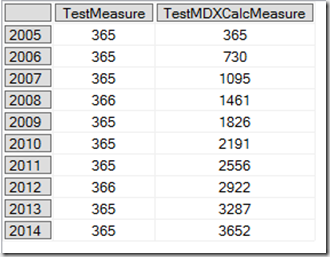
MDX calculations defined in the WITH clause of a query are supported, which is really useful if you’re writing custom MDX queries for SSRS. For example the following query works and generates the same SQL (though with a few more executions) as the previous query:

WITH
MEMBER [Measures].[TestMDXCalcMeasure] AS 
SUM(NULL:[DimDate].[CalendarYear].CURRENTMEMBER,
[Measures].[TestMeasure])

SELECT
{[Measures].[TestMeasure],
[Measures].[TestMDXCalcMeasure]} 
ON 0,
[DimDate].[CalendarYear].[CalendarYear].MEMBERS 
ON 1
FROM
[Model]

image

All in all, this looks like a solid piece of work by the SSAS dev team. Go and test it! I would love to hear from anyone with genuinely large amounts of data (maybe APS/PDW users?) regarding their experiences with 2016 DirectQuery. Recently I’ve been working with a customer using SSAS Multidimensional in ROLAP mode on top of Exasol and I’ve been surprised at how well it works; I would imagine that 2016 DirectQuery and APS would be an even better combination.

One last thought. If we get the ability to query a cloud-based Power BI mode with MDX and MDX on DirectQuery is supported in Power BI too, why would you bother paying for an expensive SQL Server Enterprise/BI Edition licence plus hardware to use DirectQuery when you can get almost the same functionality in the cloud for a fraction of the price?


SQL Server Error Log Reader

$
0
0

Reading the SQL Server Error Log is miserable.  It contains very useful information you should address as soon as possible, or at least know that it’s happening.  However, it’s hidden between so many informational messages that it’s hard to find, then it’s spread out between multiple files for every server reboot or automated file rollover event you may have set up.

Many DBAs skim these files, but when there’s a single login failure mixed into log backups running every 5 minutes for 100 databases then they’re just happy to have found something.  That login failure tells you nothing, just that someone should have been more careful typing in their password, right?  When you’re just happy you were even able to find something then you’re almost certainly not going to see it clearly enough to notice a trend, such as that login failure happens every Sunday between 10:00 PM and 10:15 PM.  However, if you knew that then you could tell someone that there’s an automated job that’s failing, it’s obviously part of a bigger process because the time varies a little, but it’s consistent enough to say it’s definitely a process.

So, the trick is to get past the junk and to the useful information.  You can listen to Warner Chaves (b|t) in his Most Important Trace Flags post and turn on trace flag 3226 to stop backup information from going to the logs, but I’m always paranoid (it’s part of the job) that it just may come in useful some day.  I know it never has, but I leave it in there anyways.

Even if you do take out information from the logs like that, it’s still a flat file that’s difficult to analyze for any number of reasons.  We’re just a T-SQL kind of group, and flat files just fall flat.

As with everything in SQL Server, I cheat my way through it.  This time I pull it into a temp table, delete the stuff I’m ignoring (please be very, very careful about what you ignore because you’ll never know it happened), then look at the results.  If there’s a login failure then I’ll uncomment the section that deletes everything except a single error and trends will pop out at me.  If I wanted to do more advanced analysis I would run queries doing aggregates of any kind against the temp table that was created.  Everything’s in the format you’re used to analyzing, so you can do crazy things without going crazy.

DECLARE @dStart DateTime , @dEnd DateTime, @MaxLogFiles Int 

SELECT @dStart = GetDate()-30, @dEnd = GetDate()-0, @MaxLogFiles = 5--Pulls into #TempLog because an empty log file causes errors in the temp table
--If there are no records, don't pass the issues onto your #Log table and return the resultsIF OBJECT_ID('tempdb..#Log') IS NOT NULL BEGIN
	DROP TABLE #LogEND

IF OBJECT_ID('tempdb..#TempLog') IS NOT NULL BEGIN
	DROP TABLE #TempLogEND

CREATE TABLE #Log(LogDate DateTime, ProcessInfo NVarChar(50)
	, LogText NVarChar(1000)
)CREATE TABLE #TempLog(LogDate DateTime, ProcessInfo NVarChar(50)
	, LogText NVarChar(1000)
)DECLARE @Num int
SELECT @Num = 0WHILE @Num < @MaxLogFiles BEGIN
	TRUNCATE TABLE #TempLog INSERT INTO #TempLog exec xp_readerrorlog @Num, 1, null, null, @dStart, @dEndIF @@ROWCOUNT > 0 BEGIN
		INSERT INTO #Log SELECT *FROM #TempLogEND ELSE BEGIN
		SELECT @Num = @MaxLogFilesEND
	SELECT @Num = @Num + 1END /*
--Uncomment to trend out a specific message and ignore the rest
DELETE #Log
WHERE LogText NOT LIKE 'Login failed for user ''WhatAreYouDoingToMe?!?!?''%'
--*/

--Ignore most of the log file rollover process
--Keep "Attempting to cycle" and "The error log has been reinitialized" if you want to confirm it happened and succeededDELETE #Log WHERE LogText LIKE '%(c) Microsoft Corporation%'OR LogText LIKE 'Logging SQL Server messages in file %'OR LogText LIKE 'Authentication mode is MIXED.'OR LogText LIKE 'System Manufacturer: %'OR LogText LIKE 'Server process ID %'OR LogText LIKE 'All rights reserved.'OR LogText LIKE 'Default collation: %'OR LogText LIKE 'The service account is %'OR LogText LIKE 'UTC adjustment: %'OR LogText LIKE '(c) 2005 Microsoft Corporation.'--Should I be ignoring this or fixing it?OR LogText LIKE 'Microsoft SQL Server % on Windows NT %'OR LogText LIKE 'The error log has been reinitialized. See the previous log for older entries.'OR LogText LIKE 'Attempting to cycle error log.%'--Ignore databases being backed up and integrity checks running, assuming you verify this some other way.
--I don't want to complain to try to have these removed because I may need that info someday; today isn't that day.DELETE #LogWHERE LogText LIKE 'Log was backed up%'OR LogText LIKE 'Database differential changes were backed up%'OR LogText LIKE 'Backup database with differential successfully %'OR LogText LIKE 'Backup database successfully %'OR LogText LIKE 'Database backed up%'OR LogText LIKE 'DBCC CHECK% found 0 errors %'OR LogText LIKE 'CHECKDB for database % finished without errors %'--We all have vendor databases...
--Ignore the stuff where it keeps making sure the setting is where the setting was.DELETE #LogWHERE LogText LIKE 'Configuration option % changed from 30 to 30.%'OR LogText LIKE 'Configuration option % changed from 5 to 5.%'OR LogText LIKE 'Setting database option COMPATIBILITY_LEVEL to 100 for database ReportServer%'OR LogText LIKE 'Configuration option ''user options'' changed from 0 to 0. Run the RECONFIGURE statement to install.'--Now your own custom ones
--Just be careful.  You'll rarely read logs without this script once you see how easy it is.
--If you put it on the ignore list, you won't see it again.
--I have starting and stopping traces on mine, because my monitoring software likes to start and stop them a lot
----I'm accepting the risk that I won't see other people starting and stopping traces.DELETE #LogWHERE LogText LIKE 'Know what risk you''re taking on by putting stuff in here'OR LogText LIKE 'You will rarely read logs without this, so you won''t see these ever again'OR LogText LIKE 'DBCC TRACEON 3004,%'OR LogText LIKE 'DBCC TRACEON 3014,%'OR LogText LIKE 'DBCC TRACEON 3604,%'OR LogText LIKE 'DBCC TRACEOFF 3604,%'OR LogText LIKE 'DBCC TRACEON 3605,%'OR LogText LIKE 'Error: %, Severity:%'--They give the english version nextOR LogText LIKE 'SQL Trace ID % was started by %'OR LogText LIKE 'SQL Trace stopped.%'OR LogText LIKE 'Changing the status to % for full-text catalog %'OR LogText LIKE 'I/O was resumed on database %'OR LogText LIKE 'I/O is frozen on database %' /*
--When mirroring gives me trouble it lets me know by flooding the logs
--I uncomment this to see if there were other issues in the middle of all that.
DELETE #Log 
WHERE LogText LIKE 'Database mirroring is inactive for database%'
	OR LogText LIKE 'The mirroring connection to%has timed out%'
	OR LogText LIKE 'Database mirroring is active with database%'
--*/

/*
--This is only useful if you're using the trace flag 1222
--Only show the line that says 'deadlock-list'.  Remove this if you need to see the deadlock details.
--Note, only use this when needed.  It will give you a 1 second blind spot for every deadlock found.
--Why aren't you using extended events anyways?
DELETE L
FROM #Log L
	INNER JOIN #Log L2 ON L.LogDate BETWEEN L2.LogDate AND DateAdd(second, 1, L2.LogDate) AND L.ProcessInfo = L2.ProcessInfo 
WHERE L2.LogText = 'deadlock-list'
	AND L.LogText <> 'deadlock-list'
--*/SELECT * FROM #LogORDER BY LogDate DESC

Don’t Ignore Me

Anything you ignore you won’t see here again. It’s still in the logs, but not in what you’re reading on your screen when you mentally check the logs off as being read through.  If you’re ignoring anything make sure it either doesn’t matter or you’re watching for it another way.

Backups are the first thing to be ignored.  Yes, yes, they ran successfully, they do that a lot, don’t tell me about them.  That can be good advice gone horribly wrong.  Do you have another way of saying I absolutely know I have backups taken of everything?

DBCC CheckDB ran successfully is next on the list.  Same thing goes for it, except more DBAs miss verifying that this is running and also miss running it.  If you ignore it, how are you verifying that it ran?

I don’t care how you do it.  Do what works best for you, just do something.

Be Careful

I’ll just end by saying be careful again. This code is a life saver when it’s not shooting you in the foot.


Filed under: Monitoring, Scripts, SQL Server Tagged: error log, monitoring

Monday Morning SQL Break – November 16, 2015

$
0
0

unicorn pirateIt’s Monday time for this week’s weekly blog and twitter round-up for last week. If you haven’t already, follow me on twitter (@StrateSQL). This is a good chance to catch up on data platform technology and career related information I’ve shared in the last week and activity on this blog.

Most Popular Article Shared

Last weeks most popular link is an blog post by Grant Fritchey (Blog | @GFritchey) on the use of Zoomit.  Zoomit is an excellent tool that many presenters use.  Unfortunately, sometimes people forget and presentations can be hard to follow if the detail is hard to see.  In this post, Grant talks about this problem and some etiquette to remember in these circumstances.

Last Week’s Popular Posts

The most popular posts on this blog in the week are:

  1. 31 Days of SSIS – The Introduction (389)
  2. Get Just The Tools: SSMS Download (313)
  3. 31 Days of SSIS – Raw Files Are Awesome (1/31) (191)
  4. 31 Days of SSIS as a Book (171)
  5. Looking to SQL Server 2014 High Availability In Standard Edition (141)
  6. XQuery for the Non-Expert – Value (120)
  7. The Side Effect of NOLOCK (109)
  8. Security Questions: Difference Between db_datawriter and db_ddladmin? (88)
  9. Security Questions: Removing Logins From Databases (83)
  10. 31 Days of SSIS – Generating Row Numbers (23/31) (79)

Last Week’s Top 20 “Reading” Links

Along with the most popular link, here are the top twenty items relating to SQL Server, technology and careers that were shared last week. If you missed them throughout the week, here’s the opportunity to get caught up on some items that other’s read after I linked them out.

  1. ZOOMIT! [44 clicks]
  2. Lessons Learned About Speaking [25 clicks]
  3. Capture Execution Plan Warnings using Extended Events [22 clicks]
  4. Analyze data with Azure Machine Learning [20 clicks]
  5. Service Broker Enhancements in SQL Server 2016 [18 clicks]
  6. Teradata to restructure, sell marketing software unit, bet on cloud [16 clicks]
  7. The Future of Datazen – SSRS [15 clicks]
  8. The MERGE and large data sets [14 clicks]
  9. My Experience Moving WordPress From @GoDaddy to @Azure [13 clicks]
  10. The Five Stages of Dynamic SQL Grief [11 clicks]
  11. Hash Joins on Nullable Columns [11 clicks]
  12. In Review: SQL Server 2005 Waits and Queues [11 clicks]
  13. Microsoft to acquire data protection firm Secure Islands [11 clicks]
  14. Load Data with Azure Data Factory [9 clicks]
  15. Machine Learning: Machine Learning and Text Analytics [9 clicks]
  16. Microsoft Business Intelligence – our reporting roadmap [9 clicks]
  17. 5 Questions With Meagan Longoria [8 clicks]
  18. Machine Learning: Excel Add-in for Azure ML [7 clicks]
  19. Visualize data with Power BI [6 clicks]
  20. Machine Learning: Machine Learning for Industry: A Case Study [6 clicks]

Last Week’s Posts From Previous Years

Sometimes the most useful content on a blog wasn’t written in the past week, it’s often other articles shared in the past that resonate with readers. Check out the following links that I published in past years over the past week:

  1. White Paper of Supportability Roadmaps (2010-11-09)
  2. Incrementing Values (2007-11-14)
  3. Lost in Translation – Deprecated System Tables – syslogins (2012-11-16)
  4. Lost in Translation – Deprecated System Tables – sysmembers (2012-11-16)

Other Items Shared

Of course, no week would be complete without a few off-topic links. These have nothing to do with technology or your career, but they are interesting and worth a second look.

  1. Joe’s Crab Shack Is the First Major Chain to Drop Tipping [21 clicks]
  2. There’s a new ‘Star Wars’ trailer, and it’s got a surprising amount of new footage [14 clicks]
  3. Apparently Everything Will Kill You. Yes, Even That. [12 clicks]

Got something you think I should read and share, leave a comment below. Also, if you want to see all of the links that were tweeted out last week?

SQL Symmetric Encryption TSQL

$
0
0
Recently my client wanted to create a password vault in SQL database to store SQL Server service account, SQL users and their respective passwords. I used symmetric key to create encryption for the encrypting the password, Find the T-SQL below to accomplish this.

Assumption:-

DB Name - SQLDBA
TableName - SQLAccounts

--********create password encrypted column*********
USE SQLDBA
GO
ALTERTABLE SQLAccounts 
ADD EncryptedSQLPassword varbinary(MAX)NULL
GO

--********Create Master Key*********
USEmaster;
GO
SELECT*
FROMsys.symmetric_keys
WHERE name ='##MS_ServiceMasterKey##';

--**********Create database Key*********
USE SQLDBA
GO
CREATEMASTERKEYENCRYPTIONBYPASSWORD='p@ssw0rd';
GO

--*********Create self signed certificate*********
USE SQLDBA;
GO
CREATECERTIFICATE SQLAccountCertificate
WITHSUBJECT='Protect SQL Password';
GO

--**********Create Symmetric Key***********
USE SQLDBA;
GO
CREATESYMMETRICKEY SQLAccountSymmetricKey
 WITHALGORITHM=AES_128 
 ENCRYPTIONBYCERTIFICATE SQLAccountCertificate;
GO

--*********TSQL to Insert New row with encrypted Password**********
USE SQLDBA;
GO
OPENSYMMETRICKEY SQLAccountSymmetricKey
DECRYPTIONBYCERTIFICATE SQLAccountCertificate;
GO
INSERTINTO SQLAccounts VALUES ('ServerName\Instance','SQLusername',EncryptByKey(Key_GUID('SQLAccountSymmetricKey'),'Password'))
GO
-- Closes the symmetric key
CLOSESYMMETRICKEY SQLAccountSymmetricKey;
GO

--*************TSQL to view decrypted Password**************
USE SQLDBA;
GO

OPENSYMMETRICKEY SQLAccountSymmetricKey
DECRYPTIONBYCERTIFICATE SQLAccountCertificate;
GO
-- Now list the original ID, the encrypted ID 
SELECT*,CONVERT(varchar,DecryptByKey(EncryptedSQLPassword))AS'EncryptedSQLPassword'
FROM dbo.SQLAccounts;
 -- Close the symmetric key
CLOSESYMMETRICKEY SQLAccountSymmetricKey;

--*********TSQL to update the encrypted column*************
USE SQLDBA;
GO
-- Opens the symmetric key for use
OPENSYMMETRICKEY SQLAccountSymmetricKey
DECRYPTIONBYCERTIFICATE SQLAccountCertificate;
GO
UPDATE SQLAccounts
SET EncryptedSQLPassword =EncryptByKey(Key_GUID('SQLAccountSymmetricKey'),Password)
FROM dbo.SQLAccounts;
GO
-- Closes the symmetric key
CLOSESYMMETRICKEY SQLAccountSymmetricKey;
GO

T-SQL Search Snippets

$
0
0

Here are two snippets that I use often to search for objects on a variety of servers. The first will search any object within a database and the second will search various elements of SQL Agent jobs.

Object search

USE [$databaseName$]
DECLARE @keyword VARCHAR(128) = '$keyword$'

SELECT o.[type_desc]
, s.name [schema]
, o.name [table]
, c.name [column]
FROM sys.objects o
INNER JOIN sys.schemas s ON s.schema_id = o.schema_id
LEFT JOIN sys.columns c ON c.object_id = o.object_id
WHERE o.name LIKE '%' + @keyword + '%'
OR c.name LIKE '%' + @keyword + '%'
OR s.name LIKE '%' + @keyword + '%'
ORDER BY o.[type_desc], s.name, o.name, c.name

SQL Agent job search

DECLARE @keyword VARCHAR(128) = '$keyword$'

SELECT j.name
,js.step_name
,js.command
FROM msdb.dbo.sysjobs j
INNER JOIN msdb.dbo.sysjobsteps js ON js.job_id = j.job_id
WHERE j.name LIKE '%' + @keyword + '%'
OR js.step_name LIKE '%' + @keyword + '%'
OR js.command LIKE '%' + @keyword + '%'
ORDER BY j.name, js.step_name, js.step_id

Microsoft SQL Server resourceWritten by Derik Hammer of SQL Hammer

Derik is a data professional focusing on Microsoft SQL Server. His passion focuses around high-availability, disaster recovery, continuous integration, and automated maintenance. his experience has spanned long-term database administration, consulting, and entrepreneurial ventures.

Derik gives the SQL community credit for plugging the gaps in his knowledge when he was a junior DBA and, now that his skills have matured, started SQLHammer.com as one small way to give back and continue the cycle of shared learning.

Derik is the owner and lead author of SQL Hammer, a Microsoft SQL Server resource.

For more information, visit http://www.sqlhammer.com. Follow Derik on Twitter for SQL tips and chat

The post T-SQL Search Snippets appeared first on SQL Hammer.

Viewing all 3458 articles
Browse latest View live